

AI vocals and AI music are well and truly here and as a mixing engineer it is my job to adapt to the new ways producers are making music and continue to help them make their tracks sound the best they possibly can.
One of the great advances in AI is that of vocal sound generation and cloning. Whether that is changing a voice to suit a certain genre, generating lush backing vocals to finish off a production, or using voice cloning to punch in lyric changes, the amount of ways you can use AI has grown dramatically.
Used right, this is great news for producers and artists, but what about for mixing engineers? While AI mixing and mastering is a thing, I believe there will always be a place for mixing engineers who can adapt to this new landscape and help make these AI tools sound even better. After all, that is the mix engineers’ main (if not only) job – make things sound better!
AI vocals have come a long way in a short amount of time. However, while they can sound great in isolation, they can sometimes be tricky to fit into a mix – particularly if stem splitting has been involved. So here are some of the ways I approach AI generated vocals and how I try get them to blend seamlessly with the production around them.
Reducing “Digital” Noise and Artefacts
One of the main issues I have run into when mixing AI vocals is that there can often be some quite unpleasant noise and artefacts that make the audio sound overly “digital”. This noise usually sits in the high frequencies and can sound like ringing of filtering. This can be particularly noticeable if the vocals have been stemmed out using stem splitting.
The first thing I will try in tackling this issue is simple EQing. Using a high-q EQ curve, you can often notch out some of the problematic frequencies. I find these tend to be up in the 9-12khz area. Be careful not to notch too many frequencies or you will introduce some comb filtering, doubling your trouble!
For particularly tricky resonances, those that pop up intermittently, a dynamic EQ can be perfect. There are many types of dynamic EQs on the market now, from FabFilter Pro-Q, to “smarter” plugins such as Soothe 2 and RESO. Using any of these tools to tame resonances only when they pop out is a great way of treating the problem without effecting the overall sound of the vocal.
Tip: For smart tools such as Soothe, avoid the temptation to let it choose which frequencies to treat. Listen to each band you select and make sure you’re only reducing the problems.
Where EQ doesn’t get the job done, a great mixing tool can be the plugin version of Izotope RX Voice De-Noise. Placing this at the start of the EQ chain (or just after your notch EQ) and very lighting de-noising the high end can give a substantially smoother result.
A more detailed look at how to reduce digital noise using Izotop RX Voice De-Noise
De-Essing AI Vocals
A lot of AI generated vocals have quite a lot of high frequency information. Using a de-esser to tame this is a great option.
Focussing on narrower bands and doing multiple but less processing can get good results. You don’t just have to use this to treat the “S” sounds either. Any harsh or overbearing sounds above 3khz can be treated using a de-esser.
Editing Your AI Vocals
Good old-fashioned editing can go a long way when mixing AI Vocals. Clean up the tops and tails of your vocal phrases to remove any unwanted information. If your AI vocals already have effects on them (reverb, delay etc), be careful with your fade-outs and you don’t want to make the tail end of phrases sound unnatural.
Also consider editing out any breaths or using clip gain to manually reduce strange phrases. It is surprising how much you can edit a vocal in isolation without it sounding chopped up in the mix!
Tip: Watch out for pops and clicks – AI generated vocals are not immune to these digital artefacts. Editing them out manually or using a de-clicker is recommended.
Saturation
Using saturation when mixing AI generated vocals is a great way to make them sound more ‘real’ or ‘alive’. Careful saturation can lend warmth and a more natural vibe to the sound, bringing it out of the “digital” realm (much like we tried to do with the earlier EQ cuts).
You can use tape saturation to smooth out vocals, and even use the Wow and Flutter parameters to add some modulation. This is all about subtly adding some interest to the audio so that moves and breathes with the rest of the track.
Tube or console drive/saturation is a slightly more noticeable way to achieve this, although should be used carefully as it can impact the clarity of the vocal and make it sound more “clouded”.
Tip: A harmonic EQ, such as Slate Digital’s Fresh Air, can be a great way of adding back in some top end that might have been removed during the initial EQ stage.
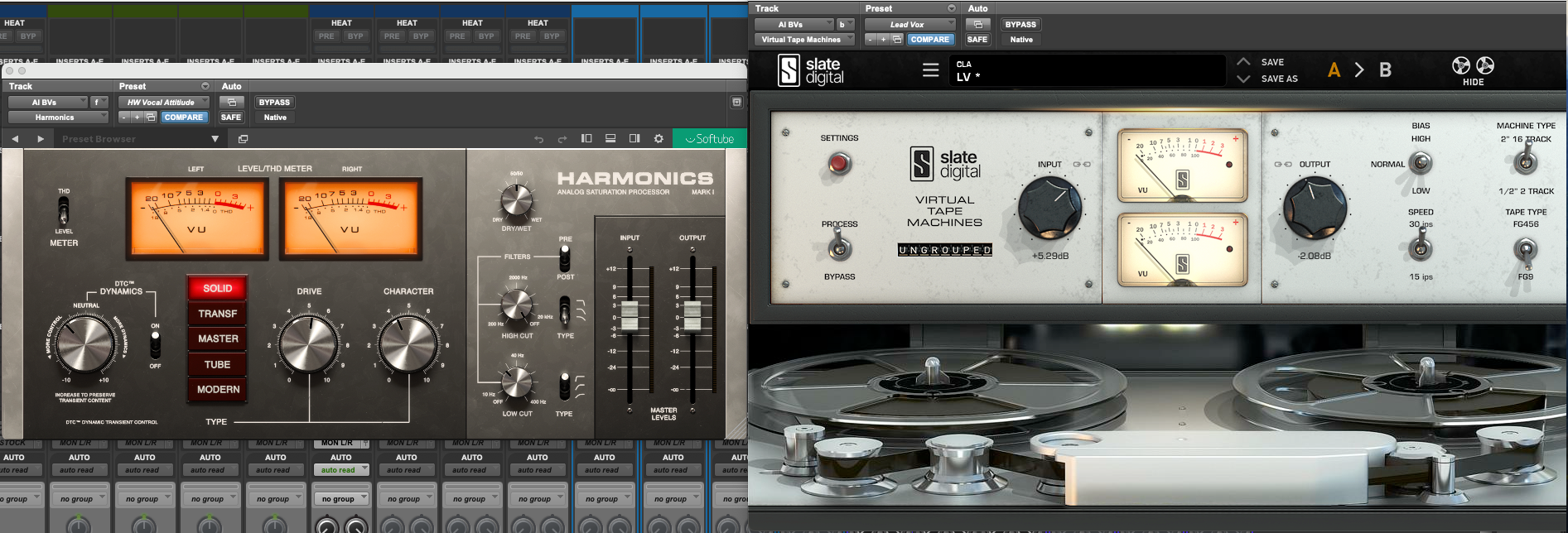
Tube vs Tape – some of the many types of saturation you can use when mixing AI vocals
Mid-Side EQ
If you’ve got some beautiful backing vocal stacks that you’ve created, but they aren’t quite sitting right or the balance is a touch off, mid-side EQ can be an invaluable tool.
The idea here is that we are adjusting the balance between the middle and side channels to try create some more width or separation. For example, by boosting the MID channel, with a wide-Q, at around 1khz, you can bring out whatever voices are in the centre – making them sound more like a lead. Likewise, if the lead is sticking out too much, boosting the SIDE channel can help rebalance the two.
Also consider using different EQ curves for the left and right channel. This can help create more of a difference between the L and R channels, increasing width. As always, be careful you don’t impact the phase negatively or your LR channels might cancel each other out.
Compression
Be careful with compression! Adding some subtle compression, particularly if you are using a “vibey” compressor that adds some colour, can be great, but you may also be bringing out more of the bad digital stuff we’re trying to hide!
AI generated vocals also tend to already have quite a compressed sound, so they may not need too much more.
Use Delay on AI Vocals Instead of Reverb
If you want to create some more space, instead of reaching for a reverb, try using a delay with a short delay time (like a slap delay).
This can give the feel of the vocal being in a room, without the issues of reverb tails and reflections muddying up the rest of the mix. You can use the feedback parameter to add “length” the delay as well.
Similarly, you could use the pre-delay and early reflections settings on a reverb plugin to help set the sound back in the mix. To achieve this, make sure your reverb parameter is off or turned all the way down, and use the pre-delay and early reflections sliders to move the vocal closer or further away.
As has always been the case, the music production world is changing. While the possibilities for songwriters, producers and artists are quite exciting, so are they for mixing and mastering engineers. Learning how to best use these sounds and integrate them into full mixes is going to be an invaluable tool moving forward.
If you would like to know more about how to mix AI generated music, or are looking for a mix engineer to help with your productions, please get in touch!
AI VOCALS MIXING TEMPLATES: I have added some AI vocal mixing templates to my store to help you get started. Check out the AI Lead Vocal and AI Backing Vocals chain templates!